Simple Saver
A no hoops savings account with no monthly interest criteria.{sub-heading}
Earn
{myboq-banking-rates|| ss3 || rate}% 15 pa.{rate-display}
Inclusive of a 4 month introductory special offer of {myboq-banking-rates|| ss4 || rate}% for all balances

Why choose a Simple Saver Account{yellow-border}
Looking for a no-fuss savings account with a great rate? This one’s a breeze. {sub-heading}
Open your Simple Saver Account

Better at budgeting
Manage your money easily. Set spending budgets on specific categories like groceries, bills and more. Get personalised insights and real-time alerts.

Track your bills
Never miss a payment. If you're paying bills from your Simple Saver account, we’ll give you a heads up when they're due, so you can make sure you’ve got the funds ready and waiting.

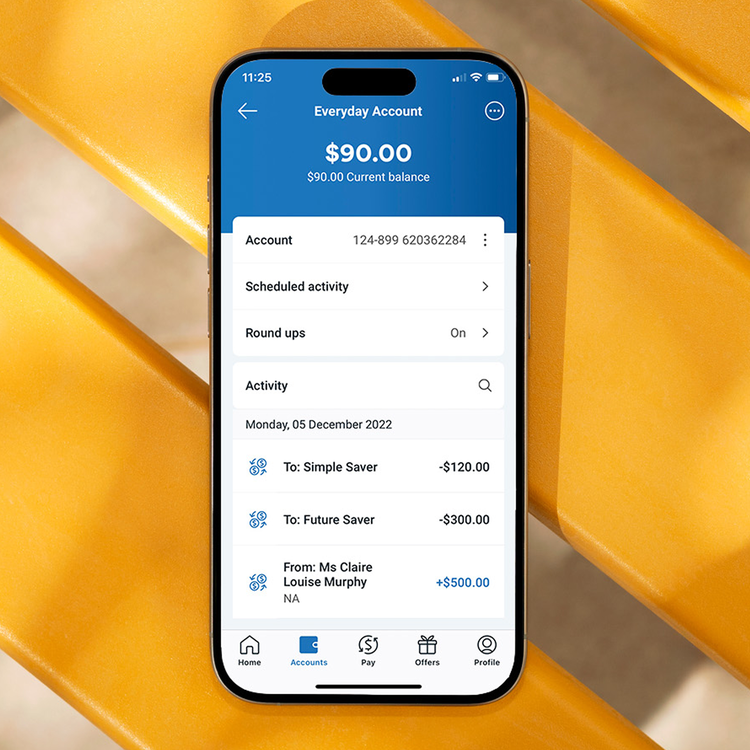
Grow your money with round ups4
When you have an Everyday Account, you can easily grow your savings with our round up feature. Simply round up your debit card transactions to the nearest dollar and we'll put the extra change straight into your nominated Simple Saver account.

Live in-app chat
We’re never far away. Get your questions sorted in our dedicated in-app customer service chat.
Things you should know{yellow-border}
- myBOQ is BOQ’s digital banking platform, designed to give you a smarter, more modern way to bank with intuitive tools and a seamless digital experience.
- myBOQ accounts – including Everyday, Future Saver, Smart Saver, Simple Saver and Term Deposit accounts – are accessed through myBOQ app and myBOQ Internet Banking.
- If you hold BOQ Classic accounts – including WebSavings, Bonus Interest Savings, Premier Investment, Day2Day Plus, Fast Track Starter and Fast Track Saver accounts – these can’t be viewed or managed in myBOQ and will continue to be accessed through BOQ Classic app and BOQ Classic Internet Banking.
Simple Saver interest rates{yellow-border}
Fees and charges
Important Documents{yellow-border}
MyBOQ Deposit Accounts General Terms & Conditions
PDF{sub-tag}
TMD - The Simple Saver Account
PDF{sub-tag}
myBOQ Deposit Account Interest Rates, Transaction Limits, Fees and Charges document
PDF{sub-tag}
Frequently asked questions{yellow-border}
If you can’t find the answer to your question here, there’s more support available.{sub-heading}
How many online savings accounts should I have?
The number of online savings accounts you should have depends on your financial goals and preferences. Having multiple savings accounts can help you manage various savings goals separately, such as emergency funds, vacation savings or mortgage payments.
However, having too many accounts might become overwhelming to manage, so it’s important to find a balance that suits you. Ultimately, the right number of accounts is whatever allows you to effectively track your progress towards your goals, while maximising your savings potential.
With a Simple Saver account, you can open up to 9 savings accounts on the myBOQ app to get your savings sorted.
Can I open a joint account?
Yes, accounts can be opened with 2 people only as joint owners. Once you’ve completed your application, we’ll send the other party a message with details on how to get started.
If they're a new myBOQ customer, they'll get a unique application ID and an invite prompting them to download the myBOQ app to get started.
But if they already have myBOQ they can apply by using the application ID in the account section of their myBOQ app or myBOQ Internet Banking'. Select ‘Sign up for a new account’ and then ‘Join an existing application’.
How to set up a joint bank account?
How do I open a savings account?
What savings account has no monthly account keeping fee?
We're proud to offer several no monthly account keeping fee savings account options designed to help you grow your money without any hidden costs. Our Simple Saver, Future Saver, and Smart Saver accounts are all great options for fee-conscious savers.
Whether you're saving for a rainy day, a future goal, or building your nest egg, explore our range of savings accounts for a hassle-free way to achieve your simple savings goals.
Are there any interest conditions on a Simple Saver account?
How do I choose an online savings account?
Choosing the right online savings account all depends on your financial needs and journey. Here are a few things to consider when exploring your options:
- Start by comparing online savings account interest rates to ensure you’re earning the most from your savings.
- Look out for any hidden fees or charges, including deposit criteria and minimum balance requirements, which could all impact your earnings.
- Explore additional features or in-app tools that may help you to reach your savings goals faster.
- Prioritise safety and security, providing peace of mind for your savings.
By carefully considering these aspects, along with whether they align with your financial goals, you can confidently choose an online savings account that aligns with your needs. If you’re looking to compare savings accounts offered at BOQ, explore our range of savings account features.
What is the interest rate for an online savings account?
Online savings account rates can vary depending on the bank and the type of account you choose. Remember to consider not only the interest rate but also any fees, accessibility, and additional features offered by the bank and type of account.
By comparing options and finding the right balance, you can make the most of your savings and watch your money grow over time. At BOQ, we offer competitive savings account interest rates to help you grow your money over time.
How is interest calculated?
We calculate interest on your account from the day funds are credited to your savings account. It's calculated daily by applying the
applicable interest rate to the closing balance of your account each day as follows:
Simple Saver Account daily closing balance x interest rate (per annum)/{text-center}
Number of days in the year (365 days){text-center}
Interest is paid monthly to your account at the close of business on the last day of each calendar month. Those funds are available on the first day of the following month.
Some months have more days than others, which can affect the total dollar value of interest paid each month.
If I already have a WebSavings or Bonus Interest Savings account, can I access the myBOQ app?
To access the myBOQ app, you'll need to open a new Simple Saver savings account.
That's why accounts like WebSavings, Bonus Interest Savings, Premier Investment, Day2Day Plus, Fast Track Starter and Fast Track Saver are available through our Classic Online Banking system but not in the myBOQ app.
Can I access this account using desktop internet banking?
Do you have more Simple Saver account questions?
For more everyday transaction account and saving account FAQs.
Explore more transaction and savings accounts{yellow-border}
Looking for something different? Take a look at our other transaction and savings accounts.{sub-heading}

Everyday Account
[br]
Standalone transaction account
Our low-fee Everyday Account, available via the myBOQ app and myBOQ Internet Banking.
[br]
No monthly account keeping fees
{rate-display}
[br]

Future Saver Account
Bundled bank & save account
Our highest bonus interest savings account for 14-35 year olds bundled with the Everyday Account.
Up to
{myboq-banking-rates|| fs3 || rate}% 5 p.a.{rate-display}
[br]
On balances up to $50,000 when monthly criteria is met

Smart Saver Account
Bundled bank & save account
High bonus interest savings account designed for savers 36 years old and over bundled with the Everyday Account.
Up to
{myboq-banking-rates|| sv2 || rate}% 5 p.a.{rate-display}
[br]
On balances up to $250,000 when monthly criteria is met